As applications grow, the logic inside services often becomes more complex. A service that initially handled a few CRUD operations gradually starts containing validation, business rules, authorization, logging, caching, and database operations. Over time, this makes the code harder to understand, maintain, and test.
One of the main reasons for this complexity is that the same service is responsible for both reading data and modifying data. Although these operations work with the same entity, they usually have very different responsibilities. Write operations often require validation, business rules, and transactions, while read operations are primarily concerned with fetching data efficiently.
This is where CQRS (Command Query Responsibility Segregation) comes into the picture.
Unlike the Singleton, Factory Method, and Builder patterns that we've explored previously, CQRS is not a GoF design pattern. Instead, it's an architectural pattern that focuses on organizing an application's responsibilities by separating read operations from write operations.
Instead of using a single service for every operation, CQRS divides the application into two distinct parts:
- Commands - Responsible for creating, updating, and deleting data.
- Queries - Responsible for retrieving data without modifying the application's state.
By separating these responsibilities, each side of the application becomes easier to understand, maintain, and evolve independently. It also allows read and write operations to follow different implementation approaches whenever required.
In this article, we'll build a simple Product Management API using CQRS in ASP.NET Core. To keep the focus on understanding the pattern itself, we'll implement everything manually without using libraries such as MediatR or any automatic handler discovery mechanism. This will help us understand how commands, queries, and their handlers work behind the scenes before introducing additional abstractions in future articles.
By the end of this article, you'll have a clear understanding of the CQRS architecture, how requests flow through the application, and when it's appropriate to use this pattern in your own ASP.NET Core applications.
Why Do We Need CQRS?
Before understanding how CQRS works, let's look at a common approach used in many ASP.NET Core applications.
Suppose we're building a simple Product Management API. Following a traditional CRUD approach, we usually create a single service responsible for every operation related to products.
ProductsController
        |
        v
  ProductService
        |
        v
    DbContext
        |
        v
    Database
Over time, the ProductService starts containing methods for creating, updating, deleting, and retrieving products.
public class ProductService
{
    public Task<ProductDto> GetByIdAsync(int id);

    public Task<IEnumerable<ProductDto>> GetAllAsync();

    public Task<int> CreateAsync(CreateProductRequest request);

    public Task UpdateAsync(UpdateProductRequest request);

    public Task DeleteAsync(int id);
}
At first glance, this looks perfectly fine. In fact, this approach works well for many small and medium-sized applications.
However, as the application grows, these methods rarely remain simple.
For example, creating a product may require validating business rules, checking whether a product with the same name already exists, generating a unique SKU, uploading images, publishing domain events, and finally saving the data to the database. On the other hand, retrieving products may only require reading data and returning it to the client as efficiently as possible.
Although both operations deal with the same entity, their responsibilities are completely different.
As more features are added, the service gradually becomes responsible for handling every possible operation related to products. This often leads to large service classes that are difficult to maintain, understand, and test.
This is exactly the problem that CQRS tries to solve.
Instead of placing every operation inside a single service, CQRS separates write operations from read operations. Commands are responsible only for changing data, while queries are responsible only for retrieving data.
This clear separation keeps each component focused on a single responsibility, making the application easier to organize as it grows.
Project Overview
To keep the focus on understanding CQRS rather than building a large application, we'll create a simple Product Management API. The project will expose a few basic endpoints that allow us to perform common CRUD operations on products while demonstrating how CQRS separates read and write responsibilities.
The API will support the following operations:
- Create a Product
- Update a Product
- Delete a Product
- Get a Product by Id
- Get All Products
Although this is a simple example, the same architecture can easily be applied to larger applications with more complex business requirements.
Instead of placing all these operations inside a single ProductService, each request will have its own dedicated Command or Query along with its corresponding handler. Commands will be responsible for operations that modify data, while queries will only retrieve data. This separation keeps every class focused on a single responsibility and makes the request flow much easier to understand.
The overall architecture of our application will look like this:
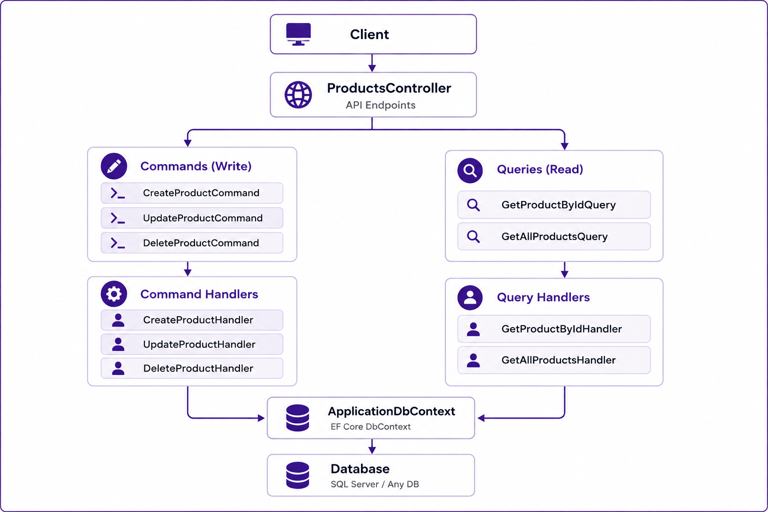
Notice that the controller doesn't contain any business logic. Its responsibility is simply to receive the incoming request and delegate it to the appropriate command or query handler. Each handler performs only one specific task, making the codebase easier to navigate, maintain, and test as the application grows.
Project Structure
Before writing any code, it's important to organize the project in a way that clearly reflects the CQRS architecture. Unlike a traditional CRUD application where controllers typically communicate with a single service, a CQRS-based application groups related functionality into Commands, Queries, their respective Handlers, and the request and response models used by the API. This organization makes the application easier to understand because each component has a single, well-defined responsibility.
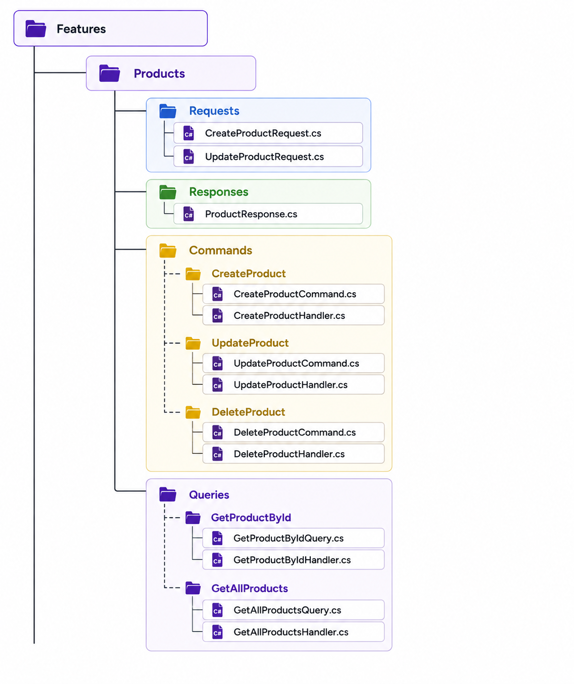
Let's briefly understand the purpose of each folder before we start implementing the application.
The Requests folder contains the models that define the data expected from the client. Whenever a user creates or updates a product, the controller receives one of these request models. These classes represent the API contract and are responsible only for capturing user input.
The Responses folder contains the models returned to the client. Instead of exposing our database entities directly, we'll return response models that include only the information we want clients to receive. This keeps the API contract independent from our internal implementation.
The Commands folder contains all write operations. Each operation, such as creating, updating, or deleting a product, has its own command class and a corresponding handler. The command carries the information required to perform the operation, while the handler contains the business logic responsible for executing it.
Similarly, the Queries folder contains all read operations. Every query has its own dedicated handler that retrieves data from the database and returns the appropriate response model. By separating read operations from write operations, the application becomes easier to maintain and each handler remains focused on a single responsibility.
By organizing the project this way, each layer has a clearly defined responsibility. The controller handles HTTP communication, request models represent client input, commands and queries define application operations, handlers contain the business logic, and response models shape the data returned to the client. As the application grows, this structure remains easy to navigate because adding a new feature typically involves creating a new command or query along with its handler, without affecting the rest of the application.
Understanding Commands
In CQRS, every operation that changes the state of the application is represented by a Command. This includes operations such as creating, updating, or deleting data. Unlike a traditional service method that directly receives a request and performs the business logic, CQRS introduces a dedicated object whose only responsibility is to carry the data required for that operation.
A command does not contain business logic or interact with the database. Think of it as a request object that describes what needs to happen rather than how it should happen. The actual processing is delegated to a separate handler, which we'll implement shortly.
For our Product Management API, creating a new product requires only the information necessary to create that product. We can represent that request using a CreateProductCommand.
public class CreateProductCommand
{
    public string Name { get; set; } = string.Empty;

    public decimal Price { get; set; }

    public int Stock { get; set; }
}
At first glance, this class looks very similar to a DTO or request model, and that's perfectly normal. However, its purpose is different. A DTO is generally used to transfer data between different layers or systems, whereas a command specifically represents an intention to perform an action. In this case, the action is to create a new product.
When a client sends a request to create a product, the controller simply creates or receives an instance of CreateProductCommand and passes it to the corresponding handler. The command itself doesn't know how the product will be validated, how it will be stored, or whether additional business rules need to be executed. Its only responsibility is to carry the information required to perform the operation.
Following the same approach, every write operation in our application will have its own dedicated command. Rather than placing all write logic inside a single service, each operation gets its own request object, making the intent of the application much clearer.
Create Product  ->  CreateProductCommand

Update Product  ->  UpdateProductCommand

Delete Product  ->  DeleteProductCommand
This separation might initially seem like additional code, but it provides a significant advantage as the application grows. Every write operation becomes isolated, easier to understand, and can evolve independently without affecting other parts of the application.
Understanding Queries
Just as commands represent operations that modify data, Queries represent operations that retrieve data. A query is responsible only for requesting information and should never change the state of the application. This separation is one of the fundamental principles of CQRS, ensuring that read operations remain independent from write operations.
In our Product Management API, we need to support two read operations: retrieving a single product by its identifier and retrieving the complete list of products. Rather than placing both operations inside a service class, we'll create a dedicated query for each request.
Let's start with retrieving a product by its identifier.
public class GetProductByIdQuery
{
    public int Id { get; set; }
}
This class is intentionally simple because the only information required to retrieve a product is its unique identifier. Similar to a command, a query doesn't contain any business logic or communicate with the database. Its responsibility is simply to represent the data required for a read operation.
For retrieving all products, no input is required, so the query can remain empty.
public class GetAllProductsQuery
{
}
Although an empty class may seem unnecessary, defining a separate query for each operation keeps the architecture consistent. Every request, whether it requires parameters or not, follows the same pattern. As requirements evolve, it's common for additional filtering, sorting, pagination, or search parameters to be added, and having a dedicated query class makes those changes straightforward.
Just like commands, each read operation has its own dedicated query.
Get Product By Id   ->  GetProductByIdQuery

Get All Products    ->  GetAllProductsQuery
Separating read requests into their own query objects also makes the intent of the application much clearer. When another developer sees a GetProductByIdQuery, they immediately know that this request is responsible only for retrieving data. There is no expectation that it will perform validation, update records, or execute any business rules that modify the application's state. This clear distinction between commands and queries is what makes a CQRS-based application easier to understand and maintain as it grows.
Implementing Command Handlers
So far, we've created commands and queries, but they don't actually perform any work. Their responsibility is simply to carry the data required for a particular operation. The business logic still needs to be executed somewhere, and that's where Handlers come into the picture.
A Command Handler is responsible for processing a command and performing the requested operation. It receives the command, executes the necessary business logic, interacts with the database, and returns the appropriate result. Since every command has its own dedicated handler, each class has a single, well-defined responsibility, making the code much easier to understand and maintain.
Let's implement the handler for creating a new product.
public class CreateProductHandler
{
    private readonly ApplicationDbContext _context;

    public CreateProductHandler(ApplicationDbContext context)
    {
        _context = context;
    }

    public async Task<int> HandleAsync(CreateProductCommand command)
    {
        var product = new Product
        {
            Name = command.Name,
            Price = command.Price,
            Stock = command.Stock
        };

        _context.Products.Add(product);

        await _context.SaveChangesAsync();

        return product.Id;
    }
}
The first thing you'll notice is that the handler receives an instance of ApplicationDbContext through Dependency Injection. This allows the handler to interact with the database without creating the context manually, keeping the implementation aligned with standard ASP.NET Core practices.
Inside the HandleAsync() method, we receive an instance of CreateProductCommand. Rather than reading values directly from the HTTP request or the controller, the handler works only with the command object. It creates a new Product entity, copies the values from the command, adds the entity to the database context, and finally persists the changes using SaveChangesAsync().
Once the product has been saved successfully, the handler returns the generated product identifier. Depending on your application's requirements, you could also return the complete entity, a DTO, or a custom result object. For this example, returning the newly created product ID keeps the implementation simple and easy to understand.
The complete request flow for creating a product now looks like this:
Client
   |
   v
ProductsController
   |
   v
CreateProductCommand
   |
   v
CreateProductHandler
   |
   v
ApplicationDbContext
   |
   v
Database
Notice how the controller no longer contains any business logic. It simply receives the incoming request and forwards the command to its corresponding handler. The handler becomes the single place responsible for processing that specific operation, making the application much easier to extend as additional business rules are introduced.
The same principle applies to every other write operation. Instead of placing all create, update, and delete logic inside a single service class, each operation receives its own dedicated handler.
CreateProductCommand  ->  CreateProductHandler

UpdateProductCommand  ->  UpdateProductHandler

DeleteProductCommand  ->  DeleteProductHandler
Although this results in more classes compared to a traditional CRUD application, each class remains small, focused, and responsible for only one operation. This clear separation is one of the biggest advantages of implementing CQRS.
Implementing Query Handlers
Command handlers are responsible for modifying data, whereas Query Handlers are responsible for retrieving it. Unlike command handlers, they should never insert, update, or delete records from the database. Their only responsibility is to fetch the requested information and return it to the caller.
Let's implement the handler responsible for retrieving a product by its identifier.
public class GetProductByIdHandler
{
    private readonly ApplicationDbContext _context;

    public GetProductByIdHandler(ApplicationDbContext context)
    {
        _context = context;
    }

    public async Task<ProductResponse?> HandleAsync(GetProductByIdQuery query)
    {
        return await _context.Products
            .Where(p => p.Id == query.Id)
            .Select(p => new ProductResponse
            {
                Id = p.Id,
                Name = p.Name,
                Price = p.Price,
                Stock = p.Stock
            })
            .FirstOrDefaultAsync();
    }
}
Similar to the command handler, the ApplicationDbContext is injected through Dependency Injection, allowing the handler to communicate with the database. The HandleAsync() method receives a GetProductByIdQuery, which contains the identifier of the product that needs to be retrieved.
Instead of returning the Product entity directly, the handler projects the result into a ProductResponse. This ensures that only the data required by the client is returned, while keeping the domain entity isolated from the presentation layer. Returning DTOs is a common practice because it prevents exposing unnecessary properties and gives you complete control over the response structure.
The request flow for retrieving a product is almost identical to the command flow, except that no data is modified.
Client
   |
   v
ProductsController
   |
   v
GetProductByIdQuery
   |
   v
GetProductByIdHandler
   |
   v
ApplicationDbContext
   |
   v
Database
The same approach can be followed for retrieving multiple products. Rather than reusing the existing handler, CQRS encourages creating a dedicated handler for each operation because every request has a different responsibility.
GetProductByIdQuery   ->  GetProductByIdHandler

GetAllProductsQuery   ->  GetAllProductsHandler
Although both handlers retrieve product information, they solve different problems. One returns a single product based on its identifier, while the other returns a collection of products. Keeping them separate allows each handler to evolve independently. For example, GetAllProductsHandler may later support filtering, sorting, searching, or pagination without affecting the implementation of GetProductByIdHandler.
At this point, both sides of our CQRS implementation are complete. Commands and their handlers manage write operations, while queries and their handlers manage read operations. The only remaining step is to see how these handlers are used from the controller to process incoming HTTP requests.
Registering Handlers with Dependency Injection
Before we can use our handlers inside the controller, we need to register them with ASP.NET Core's built-in Dependency Injection (DI) container. This allows the framework to automatically create and inject handler instances whenever they're required, eliminating the need to instantiate them manually.
Since each handler depends on ApplicationDbContext, manually creating handler instances using the new keyword would quickly become difficult to manage as the application grows. By registering them with the DI container, ASP.NET Core takes care of creating the handlers along with all of their required dependencies.
The registrations can be added in Program.cs.
builder.Services.AddScoped<CreateProductHandler>();
builder.Services.AddScoped<UpdateProductHandler>();
builder.Services.AddScoped<DeleteProductHandler>();

builder.Services.AddScoped<GetProductByIdHandler>();
builder.Services.AddScoped<GetAllProductsHandler>();
Each handler is registered with a Scoped lifetime because it depends on ApplicationDbContext, which is also registered as a scoped service by Entity Framework Core. This ensures that a new handler instance is created for every HTTP request while sharing the same database context throughout that request.
If you've worked with CQRS before, you may have noticed that many examples use MediatR instead of registering handlers manually. In this article, we're intentionally avoiding any libraries that automatically discover or dispatch handlers. The goal is to understand how CQRS works under the hood before introducing additional abstractions. Once you're comfortable with the architecture, adopting libraries such as MediatR becomes much easier because you'll already understand what's happening behind the scenes.
Using Handlers in the Controller
With our handlers registered, we can now inject them directly into the controller and delegate incoming requests to the appropriate handler. Unlike a traditional CRUD application where a controller typically depends on a single service, a CQRS-based controller depends only on the handlers required for the operations it exposes.
Another important design decision is that the controller doesn't expose commands or queries directly to the client. Instead, it receives request models, maps them to commands or queries, and passes them to the corresponding handler. This keeps the API contract separate from the application layer and prevents internal implementation details from being exposed to API consumers.
Let's start by defining a request model for creating a product.
public class CreateProductRequest
{
    public string Name { get; set; } = string.Empty;

    public decimal Price { get; set; }

    public int Stock { get; set; }
}
The controller receives this request model, creates the corresponding command, and delegates the operation to the appropriate handler.
[ApiController]
[Route("api/products")]
public class ProductsController : ControllerBase
{
    private readonly CreateProductHandler _createProductHandler;
    private readonly GetProductByIdHandler _getProductByIdHandler;
    private readonly GetAllProductsHandler _getAllProductsHandler;

    public ProductsController(
        CreateProductHandler createProductHandler,
        GetProductByIdHandler getProductByIdHandler,
        GetAllProductsHandler getAllProductsHandler)
    {
        _createProductHandler = createProductHandler;
        _getProductByIdHandler = getProductByIdHandler;
        _getAllProductsHandler = getAllProductsHandler;
    }

    [HttpPost]
    public async Task<IActionResult> Create(CreateProductRequest request)
    {
        var command = new CreateProductCommand
        {
            Name = request.Name,
            Price = request.Price,
            Stock = request.Stock
        };

        var productId = await _createProductHandler.HandleAsync(command);

        return CreatedAtAction(nameof(GetById), new { id = productId }, null);
    }

    [HttpGet("{id}")]
    public async Task<IActionResult> GetById(int id)
    {
        var query = new GetProductByIdQuery
        {
            Id = id
        };

        var product = await _getProductByIdHandler.HandleAsync(query);

        if (product is null)
            return NotFound();

        return Ok(product);
    }

    [HttpGet]
    public async Task<IActionResult> GetAll()
    {
        var products = await _getAllProductsHandler.HandleAsync(new GetAllProductsQuery());

        return Ok(products);
    }
}
Notice how the controller itself contains almost no business logic. Its primary responsibility is to receive the HTTP request, convert it into the appropriate command or query, invoke the corresponding handler, and return the response to the client. All business logic, validation, and database interaction remain inside the handlers, allowing the controller to stay clean and focused on handling HTTP communication.
By following this approach, each layer has a clearly defined responsibility. Request models represent client input, commands and queries describe application operations, handlers execute the business logic, and response models shape the data returned to the client. This separation keeps the codebase organized and makes it much easier to extend the application as new features are introduced.
Advantages of CQRS
By now, you've seen how CQRS separates write operations into Commands and read operations into Queries, with each operation having its own dedicated handler. Although this introduces a few additional classes, it provides several benefits that become more apparent as an application grows.
1. Clear Separation of Responsibilities
One of the biggest advantages of CQRS is that it separates read operations from write operations. Commands are responsible only for modifying data, while queries are responsible only for retrieving it. This clear separation prevents a single service from becoming responsible for every possible operation and keeps each component focused on a single task.
2. Easier to Maintain
Since every operation has its own dedicated command or query handler, the codebase becomes much easier to navigate. If you need to modify the product creation logic, you know exactly where to look: CreateProductHandler. Likewise, if you need to optimize how products are retrieved, you only need to work with the corresponding query handler without worrying about affecting write operations.
3. Better Testability
Testing also becomes much simpler because each handler has a single responsibility. Instead of testing a large service containing multiple CRUD operations, you can write focused unit tests for individual handlers. This results in smaller, easier-to-understand test cases and makes it simpler to isolate business logic during testing.
4. Independent Evolution of Read and Write Operations
In many applications, read and write operations evolve differently. Read operations may later require filtering, searching, pagination, sorting, or caching, while write operations may require additional validations, authorization checks, or business rules. With CQRS, these changes can be implemented independently without impacting the other side of the application.
5. Improved Code Organization
As the application grows, organizing related functionality becomes increasingly important. Instead of having large service classes containing dozens of methods, CQRS organizes the application around individual operations. Each feature consists of a request model, command or query, handler, and response model, making the project structure much easier to understand for both new and existing developers.
While CQRS introduces more files compared to a traditional CRUD approach, those files are typically small, focused, and easier to maintain. For applications with growing business complexity, this trade-off often leads to a cleaner and more scalable architecture.
Drawbacks of CQRS
Like any architectural pattern, CQRS is not the right choice for every application. While it provides a cleaner separation of responsibilities and improves maintainability, it also introduces additional complexity. Understanding these trade-offs is important before deciding whether CQRS is the right fit for your project.
1. More Classes and Files
One of the first things you'll notice when implementing CQRS is the increase in the number of classes. Instead of placing all CRUD operations inside a single service, each operation has its own request model, command or query, and corresponding handler.
Although this improves separation of concerns, it also means you'll have more files to manage as the application grows.
2. More Boilerplate Code
CQRS often requires mapping between different models. In our example, the controller receives a CreateProductRequest, converts it into a CreateProductCommand, and passes it to the handler. While this separation provides flexibility, it also introduces additional code that wouldn't exist in a simple CRUD implementation.
As applications become larger, many teams use object mapping libraries such as AutoMapper to reduce this boilerplate. However, the underlying mapping still exists regardless of whether it's written manually or generated automatically.
3. Steeper Learning Curve
For developers who are new to CQRS, the architecture can initially feel more complicated than a traditional CRUD approach. Instead of having a single service responsible for all operations, requests flow through multiple components before reaching the database. It takes some time to understand the responsibility of each component and how they work together.
Once the pattern becomes familiar, however, this separation often makes large applications much easier to navigate.
4. Not Suitable for Every Application
CQRS is designed to solve problems that typically arise in applications with growing business complexity. If your application only performs simple CRUD operations with minimal business logic, introducing commands, queries, and handlers may add unnecessary complexity without providing significant benefits.
In those situations, a traditional service-based architecture is often simpler, easier to maintain, and perfectly adequate.
CQRS is a powerful architectural pattern, but like any tool, it should be used only when it solves a real problem. Choosing it simply because it's popular can make a small application more complex than it needs to be.
When Should You Use CQRS?
After understanding how CQRS works, a common question is whether it should be used in every ASP.NET Core application. The short answer is no.
CQRS is designed to solve specific architectural problems, particularly in applications where business logic becomes increasingly complex over time. While it provides excellent separation of concerns, it also introduces additional classes, handlers, and request models. If your application doesn't benefit from this separation, a traditional CRUD approach is often the better choice.
CQRS is a good fit when your application has complex business rules, multiple developers working on the same codebase, or features that continue to grow over time. In these scenarios, keeping read and write operations isolated makes the code easier to understand, maintain, and extend. It also becomes easier to optimize each side independently as new requirements emerge.
Some common scenarios where CQRS works well include:
- Large enterprise applications with complex business logic.
- Systems where read and write operations evolve independently.
- Applications that require extensive validation during write operations.
- Projects where read operations need additional optimizations such as filtering, pagination, projections, or caching.
- Long-term applications expected to grow significantly over time.
On the other hand, CQRS may not be the best choice for every project.
If you're building a small CRUD application with only a handful of endpoints and minimal business logic, introducing commands, queries, handlers, and additional request models may add unnecessary complexity. In such cases, a traditional service-based architecture is usually simpler, easier to understand, and quicker to develop.
The key takeaway is that CQRS is a tool, not a rule. It should be adopted when it solves a real architectural problem, not simply because it's a popular pattern. Choosing the right architecture based on the complexity and requirements of your application will always lead to a better and more maintainable solution.
Conclusion
In this article, we explored the fundamentals of CQRS (Command Query Responsibility Segregation) by building a simple Product Management API in ASP.NET Core. Rather than relying on external libraries, we implemented the pattern manually to understand how commands, queries, and their respective handlers work together to process application requests.
We learned how commands represent write operations, queries represent read operations, and dedicated handlers keep each operation isolated with a single responsibility. We also saw how request models, commands, queries, handlers, and response models work together to create a clean and maintainable architecture.
The implementation in this article intentionally avoids libraries such as MediatR or automatic handler discovery so that the focus remains on understanding the CQRS pattern itself. Once you're comfortable with these core concepts, introducing MediatR becomes much easier because you'll already understand the responsibilities of commands, queries, and handlers.
If you'd like to explore the complete source code for this implementation, you can find it in the GitHub repository below.
GitHub Repository: https://github.com/YogeshHadiya33/CQRSArchitecturalPattern